Exploratory Testing with a Team
Holding an exploratory testing session is a fun way to encourage teams to think from a customer perspective.

My experience is that teams value the opportunity to perform exploratory testing sessions, aka bug bashes. Not only do the team discover bugs they might never have found, but they pick up on SME knowledge. SME knowledge is something that many engineers value but rarely get an opportunity to deepen. Cross-functional teams value the chance to do something outside their typical expertise.
Use exploratory testing sessions to help explore different areas of the system and find bugs. Win-Win!
What to Test?
Most teams prefer to test something they are working on or something that is relevant to their work. This requires some extra planning, but it's worth the effort if you can achieve it. It's good to ask your team if there are any areas of the system they're keen to understand better or have concerns about in terms of quality.
The alternative is to choose some random product or a product designed for software testing exercises.
Prep Work for Exploratory Testing an in House System
It's worth putting in the effort upfront to create an environment that allows people to jump into exploratory testing quickly. Think:
1) relatively self-contained and without too many dependencies, where most of the functionality can be operated without too many mocks and stubs. Mobile apps are popular for this reason.
2) What are the devices and access rights? Are they different to yours and may require modification or creation? Once set up, ask them to log in before the session to ensure they can access it.
3) Avoid logins and authentication. That is unless you have the necessary tooling and setup. If you must have logins, create logins for people in advance or ask people to develop logins as part of the setup.
4) If possible, have a good set of diverse test data ready for users to test with. Delays for test data setup will quickly kill any curiosity and enthusiasm for the session.
5) Avoid exploratory testing in production. The risk is too high in most cases, and you load your prod environment with cruddy data.
Planning an Exploratory Testing Team Session:
Planning your session:
- If you plan to hold the ET session on-site, prepare food and drinks. If it's remote, ask people to order their favourite food. Budget permitting, of course!
- Pairing people
How will people test, individually or in pairs? (I prefer pairs with different skill sets). Will you assign pairs or allow people to choose? - Plan how to allocate the work.
Having a set of charters or focus areas helps overcome the "where do I start" anxiety many people unfamiliar with this approach have. Work can be allocated in many ways:- Split the functional menu up
- Assign quality attributes (or allow pairs to self-select)
- Ask people to make a list of possible failures and test for those
- Ask people to take on personas and test scenarios
- Different platforms (devices/browsers/apps)
- Time-based functionality
- Interfaces (API's or scheduled batch runs)
- Diversity of Test Data
- Exploratory Testing at the API layer
- Different Error Codes
- Different request types
- Diversity of request and response data
- Performance of multiple requests
- Have a schedule
It's good to time box shorter sessions. For example, a 2hour exploratory testing workshop might look like this:- Introduction and Share Cheat Sheets: 15 mins
- Test Session to familiarise and iron out glitches: 15 mins
- Map out the system using a mind map: 15 mins
- ET Session: 20 mins
- Debrief: 10 mins
- Break
- ET Session: 20 mins
- Debrief & Actions: 10 mins
- Close
- Create Cheat Sheets
Cheat Sheets are handy bits of information they can use if they get stuck.
Information to include in a cheat sheet is:- Link to bug tracking tool or method of tracking bugs
- Temporary Login's and passwords for the ET session
- References to existing information. Explainers of how the system operates, repos, swagger files, and old bugs.
- heuristics for when you get stuck in testing to trigger ideas
- Pre Information
Send out details before the event (a week is good) with links to the site, the scope of the effort, the schedule, and where you will track bugs. Include references that explain what exploratory testing is and its value. Even if you have told teams all this before, it's good not to assume pre-knowledge. - Send out the information again 2 days before reminding them about the event.
Pointers for Team Exploratory Testing Sessions
I find it best to treat these sessions in a fun and lighthearted way to build collaboration and knowledge. Think bug bash more than deep exploratory testing.
- Encourage people to pair in the testing.
- Focus on different areas of the system to introduce a variety
- Make sure people are not testing the code they know in intimate detail.
- Encourage people to pair across specialties.
- Experiment with driver/navigation pairing styles as used in mob programming
- Allow people to play to their strengths.
- Have a parking lot to collate ideas and suggestions
- Avoid skipping the debrief; it's an opportunity to hear people's perspectives.
- Make a point of saying that it's ok to get stuck and that everyone gets stuck and runs out of ideas in exploratory testing. Remind them of the cheat sheets to help with idea generation.
- Check if your team knows mind maps, and if not, have a session on mind maps and their benefit before this session uses a different approach.
- Not everyone adores exploratory testing. Allow people to express both positive and negative perspectives. Avoid making judgments or contradicting their viewpoints if they disagree with yours, though there’s no harm in explaining your perspective, as in, “I find that exploratory testing helps me...”
- Ask them if future sessions are more useful and how to improve them.
Keep the focus on fun and encourage the team's curiosity. Many teams find exploratory testing sessions a fun way to close work. Stay curious and open about your team's software testing evolution.
Happy Testing!
Bug Bashes Reading
 Lena Nyström

 Miranda Michalski
 Bhumika Srinivas
Exploratory Testing Content




 Pamela Fox
 View all posts by Stuart Ashman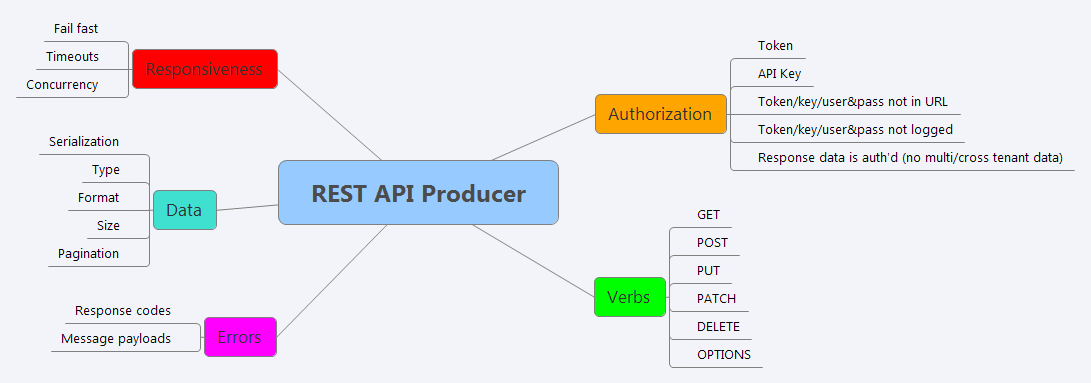
Got a decision to make, a conversation to prep, or a move to work out?
Drop in the real situation. KYM reads it through the Handbook's frameworks and gives you a move you can try.
Open Know Your Move →


Comments ()